


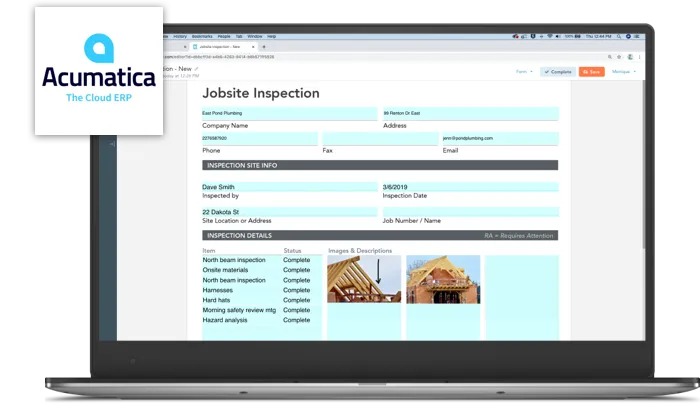
Paper forms are still common in the field. Inspection sheets, work orders, delivery tickets, timesheets and safety checklists are filled out by hand and carried back to the office. Then someone types them into the ERP. It’s slow, error-prone and expensive. The GoFormz and Acumatica or MYOB integration removes that loop. Digital forms completed on a phone or tablet flow straight into Acumatica or MYOB records.
This guide brings together everything you need to know: what the integration does, the field types that make it powerful, how to set up approvals, a construction use case, and how Asgard Alliance helps teams put it to work.
What the GoFormz and Acumatica or MYOB integration does
GoFormz is a digital forms platform. Its forms can look exactly like your existing paper documents, so digitizing your forms is quick and your teams don’t have to learn a new layout. Forms are built with a drag-and-drop builder, so no coding is needed, and they’re filled out on mobile devices, tablets or desktops from anywhere.
Connected to Acumatica or MYOB, GoFormz becomes a front end for field data capture:
- Completed forms upload automatically to the corresponding Acumatica or MYOB records, with no hand delivery, scanning or filing.
- Form data maps to Acumatica or MYOB fields, updating existing records or creating new ones from what was captured.
- Forms can be pre-populated with Acumatica or MYOB data, such as customer, project, job or item details, before they go out to the field.
Three ways to work smarter with the integration
1. Upload completed forms to Acumatica or MYOB in real time
As soon as a form is submitted in the field, an automated workflow routes it to the matching Acumatica or MYOB record. The office sees it right away. Nobody waits for a clipboard to come back at the end of the week, and there are no paper documents to store.
2. Send out forms that are already filled in
Instead of asking field staff to rewrite information that already lives in Acumatica or MYOB, dispatch forms with that data already filled in. Technicians confirm and add what’s new. That means less typing, fewer mismatched customer names or job numbers, and faster completion.
3. Capture richer data than paper ever could
Advanced field types let teams document work thoroughly without extra effort. They can focus on the job instead of the paperwork.
Field types that make the difference
The richest part of the integration is what a digital form can capture beyond text and numbers:
- Images: photos of the site, damage, installed equipment or delivered goods, attached to the record they document.
- Sketches: quick drawings of layouts, measurements or problem areas, captured on the device and kept with the form.
- GPS coordinates: the location where the form was completed, useful as proof of presence and for mapping work across sites.
- Electronic signatures: customer or supervisor sign-off captured on the spot.
- Standard text, numeric and date fields, with built-in form logic that enforces required fields and calculates totals correctly.
Because form logic validates entries before submission, the data that reaches Acumatica or MYOB is complete and consistent. That’s a big step up from deciphering handwriting on a rain-soaked page.

Custom approval workflows before data reaches Acumatica or MYOB
Not every form should go straight into your ERP. The integration supports custom approval workflows, so forms can be reviewed before their data is committed. Reviewers might be:
- Field supervisors confirming work was completed as described
- QA/QC teams checking inspections and test results
- Back-office staff verifying billing details
- Management approving change orders or exceptions
Approvals keep control where you need it while removing the manual handoffs in between.
Use case: construction job sites
Construction shows the value of the integration especially well. On a typical job site, paper forms take a long time to complete. They have to be delivered and processed by hand, they’re vulnerable to weather, they get lost, and they often contain errors that surface only when the office rekeys them. The results are project delays, reporting mistakes and billing that lags behind the work.
With GoFormz and Acumatica or MYOB:
- Daily reports, inspections and safety checklists are completed on a tablet, with photos, sketches of the site and GPS location attached.
- Change orders and work authorizations are signed electronically by the client on site.
- Supervisors approve forms before they update Acumatica or MYOB, so project records stay accurate.
- Project, job and customer data is pre-filled from Acumatica or MYOB, so crews don’t guess at job numbers.
- The office sees submissions in real time, so billing and project tracking keep up with the field.

How the data flows, step by step
A typical GoFormz and Acumatica or MYOB workflow looks like this:
- 1. Dispatch: a form is created for a job, service call or delivery, pre-filled with the Acumatica or MYOB customer, project or order details.
- 2. Complete in the field: the technician fills it out on a phone or tablet, adding photos, a sketch, GPS location and a signature. Form logic flags missing required fields before submission.
- 3. Review: if an approval step is configured, a supervisor or back-office reviewer checks the form and approves or sends it back.
- 4. Update Acumatica or MYOB: approved data is written to the matching Acumatica or MYOB record, or a new record is created. The completed form, with its images and sketches, stays linked to that record for reference.
- 5. Act on it: billing, project tracking, inventory or service follow-up can start right away, based on data that was entered only once.
Forms worth digitizing first
You don’t have to convert every paper form at once. The best candidates are forms that are filled out often, feed directly into Acumatica or MYOB, and cause delays or errors today:
- Work orders and service tickets that drive billing
- Daily job reports and timesheets that update project costs
- Inspection and QA/QC checklists that need photos and sign-off
- Delivery and proof-of-delivery tickets with signatures and GPS location
- Safety and incident reports that must be complete and traceable
- Estimates and change orders that need customer approval on site
Starting with one or two high-volume forms proves the value quickly and gives field teams time to adjust before the rest follow.
Why integrate instead of re-keying
Fewer manual processes
Every manual transfer is a delay and a chance for error. With forms flowing directly into Acumatica or MYOB, the administrative rekeying disappears, along with the mistakes it introduces.
Faster rollouts
Once a form is mapped to Acumatica or MYOB, new versions and new forms can be rolled out quickly. Nobody has to wait for someone to find time for a manual task. Because the integration runs on Acumatica’s standard, well-tested API rather than one-off scripts, it’s easier to maintain and troubleshoot.
Easier testing
Reusable test forms and scenarios let you validate the mapping and approval flow before going live, so the rollout to field teams goes smoothly.
Better visibility of mobile teams
With submissions arriving in real time, complete with time, location and photos, managers can track remote crews and make decisions based on current data, not last week’s paperwork.
Case study: Lake Restoration
Asgard Alliance helped Lake Restoration connect GoFormz with Acumatica or MYOB so field forms feed the ERP directly. It’s a real-world example of the approach described here: field data captured once, digitally, and routed into Acumatica without re-entry. Ask us for the Lake Restoration case study to see how it works in practice.
Getting started with Asgard Alliance
A successful integration starts with the forms themselves. Which forms matter most, which Acumatica or MYOB records they should update or create, what should be pre-filled, and who needs to approve what? Asgard Alliance is an Acumatica ISV partner in Montreal. Our founder, Stéphane Bélanger, has worked with ERP since 1993 and with Acumatica since 2016. He was named Acumatica Developer of the Year in 2022 and has been an Acumatica MVP for several years. We provide Acumatica customization, integration services and ISV development, and we can help you:
- Pick the forms that deliver the fastest return
- Map form fields, images, sketches, GPS data and signatures to the right Acumatica or MYOB records
- Configure pre-population and approval workflows
- Test and roll out to field teams
Ready to take your field forms paperless? Contact us to discuss your GoFormz and Acumatica or MYOB integration.