

Almost every Acumatica or MYOB customer that ships, receives or manufactures physical goods needs labels. The question is not whether to print them, but where the labeling logic should live. For years, the default answer was a separate label application connected to the ERP through exports, file drops or middleware. That approach works, but it carries costs that are easy to miss until an upgrade, an audit or a busy shipping day exposes them.
This post compares bolt-on label software with a native, certified Acumatica solution, so you can decide which model fits your operation.
What “bolt-on” usually means
Bolt-on label tools sit outside Acumatica or MYOB. Common patterns include:
- Export-based: Acumatica or MYOB exports data to a file or database table, and the label software reads it on a schedule.
- Middleware: an integration service pulls data through the API, transforms it and passes it to the label engine.
- Desktop label designers: templates live on a workstation, connected to ERP data through a database or ODBC connection.
Each can print good labels. The differences show up in security, maintenance, data freshness and how users actually work.
What “native” means
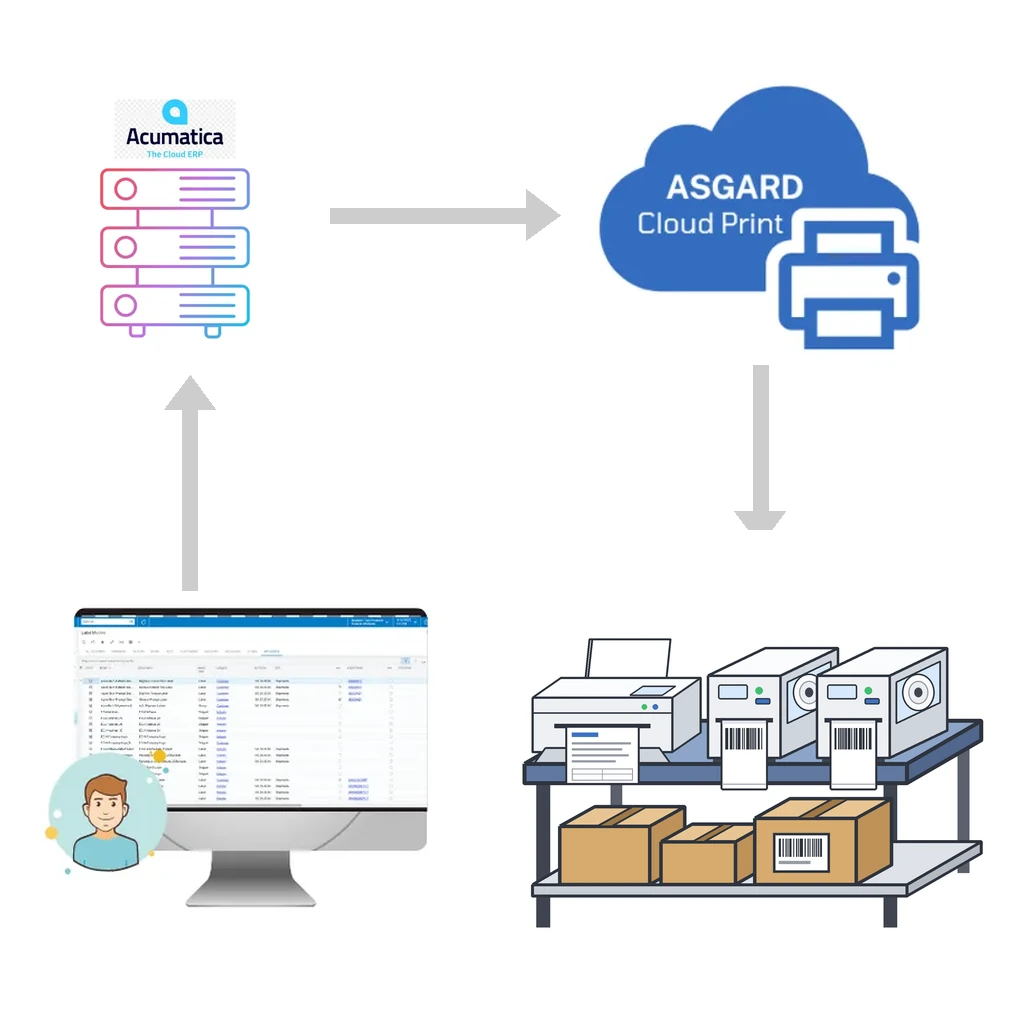
A native Acumatica label solution runs inside Acumatica itself. Label definitions, printers, rules and print history are Acumatica records. Printing is an Acumatica action on the screen the user is already working in, and the label reads the same data, with the same permissions, as the screen.
Asgard Labels is built this way. It is Acumatica-native and certified, available on the Acumatica Marketplace, and positioned as the only Acumatica-native label solution.
Security
With a bolt-on tool, data leaves Acumatica or MYOB. That creates extra places to secure:
- Service accounts with broad API or database access.
- Export files or staging tables containing customer names and addresses.
- Another application with its own users and passwords.
With a native solution, Acumatica’s own security model applies. Users print from screens they already have access to, and label setup screens are controlled with the same roles and rights as the rest of the ERP. There is no staging copy of your data to protect. When the print job does need to travel to a printer, Asgard Cloud Print encrypts everything, collects no data it does not need and never shares information.
Upgrades
Acumatica or MYOB releases major versions regularly, and every upgrade is a checkpoint for integrations. Bolt-on tools can break when fields, endpoints or database structures change, and fixing them may require coordinating several vendors: the label software, the middleware and your Acumatica partner.
A certified native solution is built and tested as an Acumatica or MYOB customization, following Acumatica’s development framework. It is upgraded alongside your ERP, by a single vendor who works with Acumatica every day. Asgard Alliance founder Stéphane Bélanger has worked in ERP since 1993 and with Acumatica since 2016, and is Acumatica Developer of the Year 2022 and a multi-year Acumatica MVP, so upgrade cycles are part of our routine, not an exception.
Data freshness
Export-based tools print what was exported, not necessarily what is true now. If a shipment’s address was corrected five minutes ago, a scheduled export may not have picked it up. If a lot was reassigned, the label may still show the old one.
A native label reads live Acumatica or MYOB data at the moment of printing. Lot numbers, expiration dates, quantities, addresses and user-defined fields are exactly what the record shows. A reprint a week later reflects the record as it is, or you can reprint the original label from history when that is what you need.
Printing from any screen
With bolt-on software, users often switch applications: find the order in Acumatica or MYOB, open the label program, search for the same order, pick a template, print. Each switch is a chance to pick the wrong record or the wrong template.
A native solution puts printing where the work happens. With Asgard Labels you can print from any Acumatica or MYOB screen: shipments, receipts, transfers, stock items, warehouse locations, production orders and your own custom screens. It takes one click, requires no coding and prints as many labels as needed, to any printer.
No duplicate data
Many bolt-on tools need their own copy of reference data: product descriptions, GTINs, customer label preferences, or even full item masters. Keeping two databases in sync is a job in itself, and when they drift, labels are wrong.
A native solution uses Acumatica or MYOB as the single source of truth. GTINs, lot classes, customer-specific requirements and translations live in Acumatica fields, including user-defined fields, and labels use them directly. Conditional rules decide which content to show, so one label design can cover multiple customers, languages or product types.
Printing infrastructure
Bolt-on tools usually need a print server or a workstation running on the local network, plus the right drivers and connection to the ERP. Native printing still needs a way to reach physical printers, and that is where Asgard Cloud Print comes in:
- Event-driven and socket-based, so jobs reach the printer almost instantly.
- Any printer the operating system knows: Zebra, Honeywell, SATO, TSC, cab and Epson ColorWorks label printers, and HP, Canon, Epson, Brother and Xerox office printers.
- Native languages: ZPL, DPL, IPL, Fingerprint, SBPL, TSPL, cab JScript and ESC/Label, plus canvas output as PDF, PCL, PostScript or image.
- Print at another site or warehouse, anywhere.
When a bolt-on tool can still make sense
To be fair, a separate label tool can be reasonable when labels are printed from several unrelated systems, or when Acumatica or MYOB is only one small source of label data. If most of your labels are driven by Acumatica shipments, receipts, inventory and production, however, keeping the labeling inside Acumatica removes an entire layer of integration and maintenance.
Questions to ask any label vendor
- Does the label read live Acumatica or MYOB data, or a copy?
- Can users print from the Acumatica or MYOB screen they are working in?
- Is the solution certified by Acumatica or MYOB, and who handles upgrades?
- Where does our data go, and how is it secured?
- Which printers and native languages are supported?
- Can we print to a printer at another site?
Keep your labels inside Acumatica or MYOB
See how Asgard Labels brings labels, barcodes and 2D barcodes into Acumatica or MYOB, learn about Asgard Cloud Print, or contact us for a walkthrough with your own screens and printers.